A strong foundation in Android architecture allows developers to create high-performing, secure, and maintainable applications. It provides a clear structure for organizing code, managing data flow, and aligning development with modern best practices across Android projects. In this guide, let’s break down Android architecture components, discuss widely used architecture patterns, and highlight why architecture plays a vital role in successful Android apps with EZTek in the article below.
What is Android Architecture?
Android architecture is a multi-layered software stack that acts as a bridge between device hardware and user applications. Founded in 2003 and later acquired by Google in 2005, the platform officially launched in 2008, introducing a flexible Android architecture framework that revolutionized multitasking and app customization.
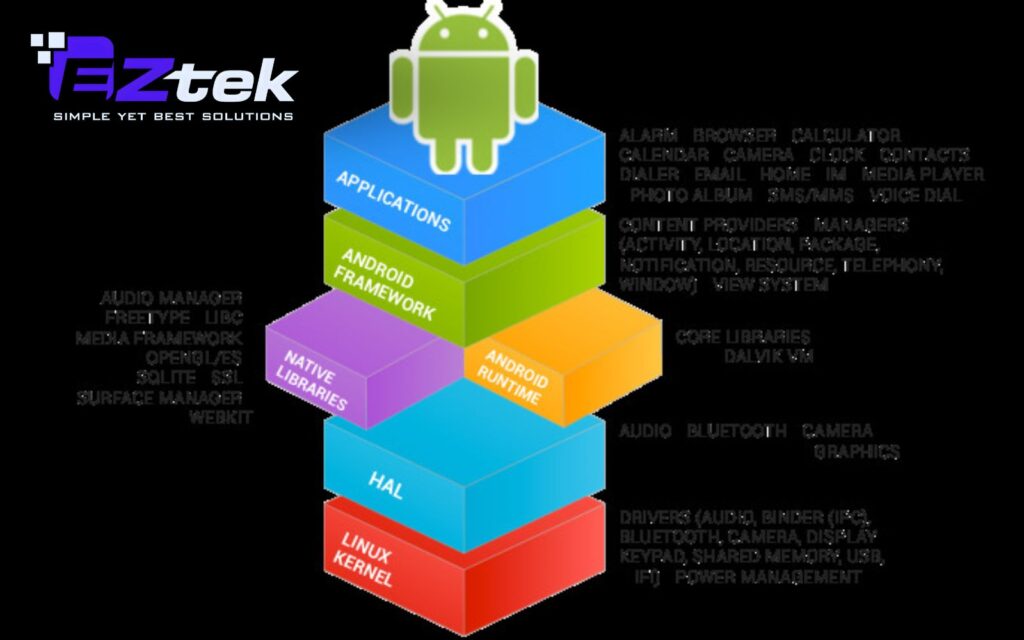
The system is structured into specific Android architecture layers built on Linux to ensure stability and high performance. By following a clear Android architecture diagram, the OS effectively manages:
- Process & Memory: Automates how apps start and close to optimize battery and RAM usage.
- Security: Enforces strict rules to protect user data from unauthorized access.
- Hardware Abstraction: Ensures apps run smoothly across different brands and models.
5 Components of Android architecture
To build a high-quality app, developers must look beneath the surface at the Android architecture layers that power every interaction. This five-tier system ensures that everything from a simple tap to complex data processing happens flawlessly.
Applications
Positioned at the peak of the Android architecture diagram, this layer is where users live. It hosts both native system apps (like Camera, Contacts, and Gallery) and third-party apps downloaded from the store. These applications function by tapping into the services provided by the underlying architecture framework.
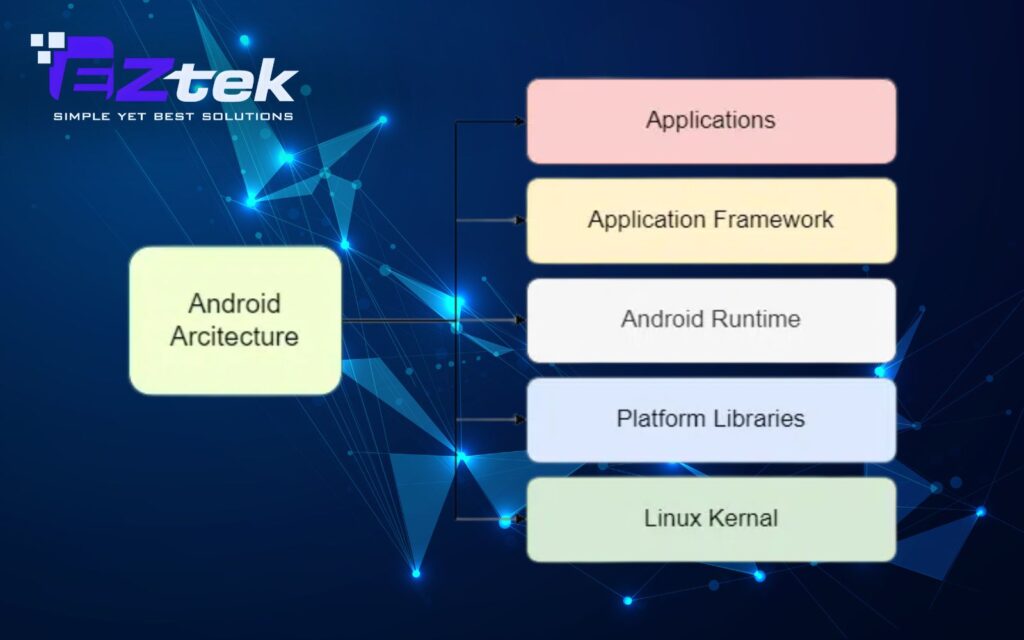
Application Framework
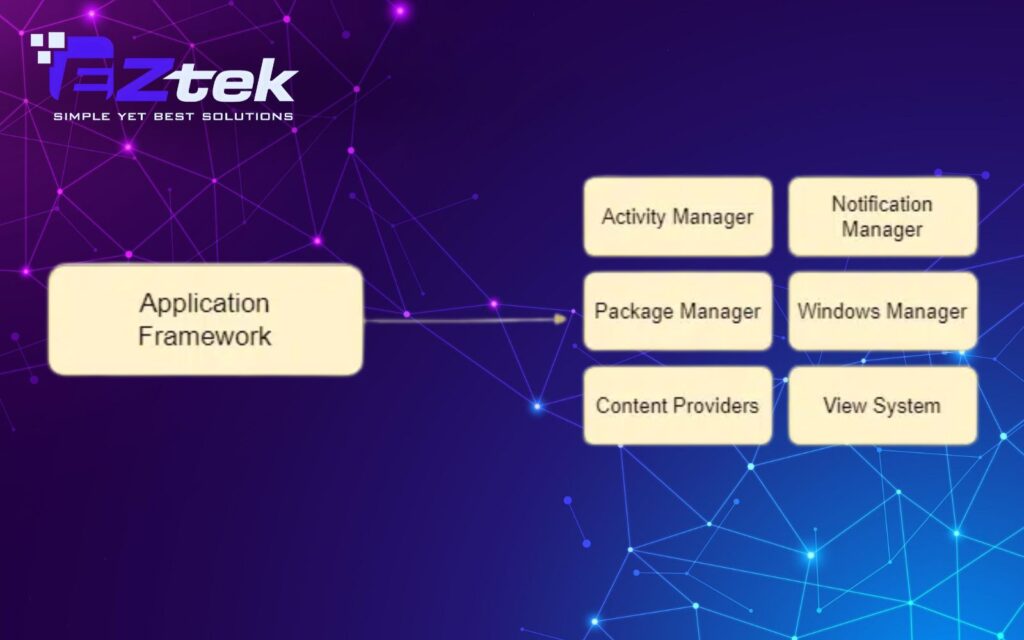
This is the toolkit for developers. Instead of coding from scratch, you use these Android architecture components to access device capabilities. Key managers include:
- Activity Manager: Governs the app lifecycle and navigation stack.
- Notification Manager: Handles user alerts and status bar updates.
- Content Providers: Facilitates secure data sharing between different apps.
- Window & View System: Controls the UI layout, from buttons to screen transitions.
Android Runtime
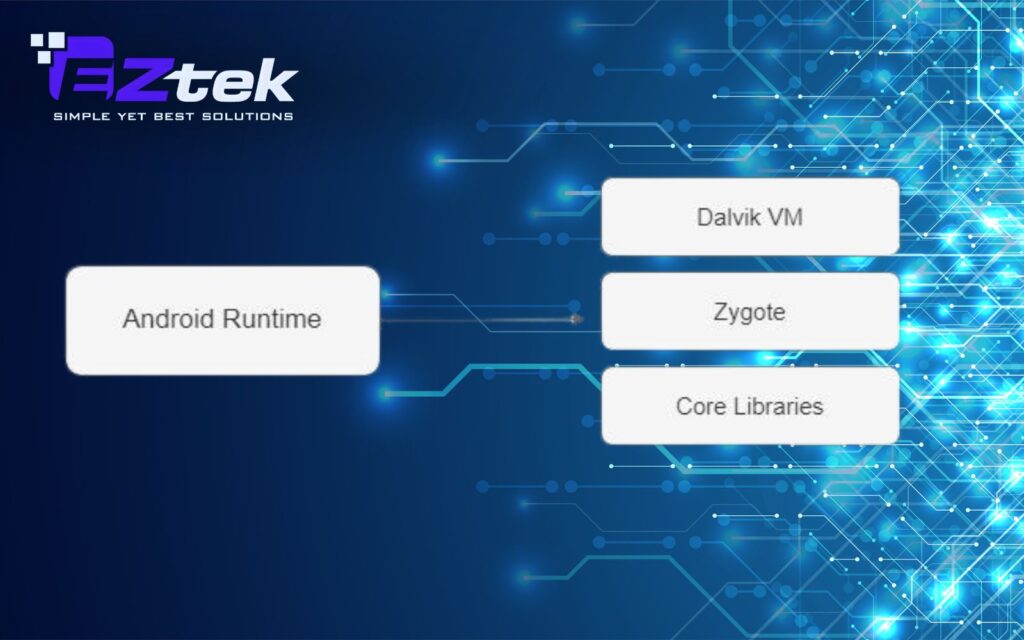
The engine room of the Android architecture. Originally using the Dalvik Virtual Machine (DVM), modern devices now utilize ART (Android Runtime). It uses ahead-of-time compilation to turn app code into machine-ready instructions, ensuring multiple apps can run simultaneously without draining the battery. It relies on core libraries that allow us to build apps using Java or Kotlin.
Platform Libraries
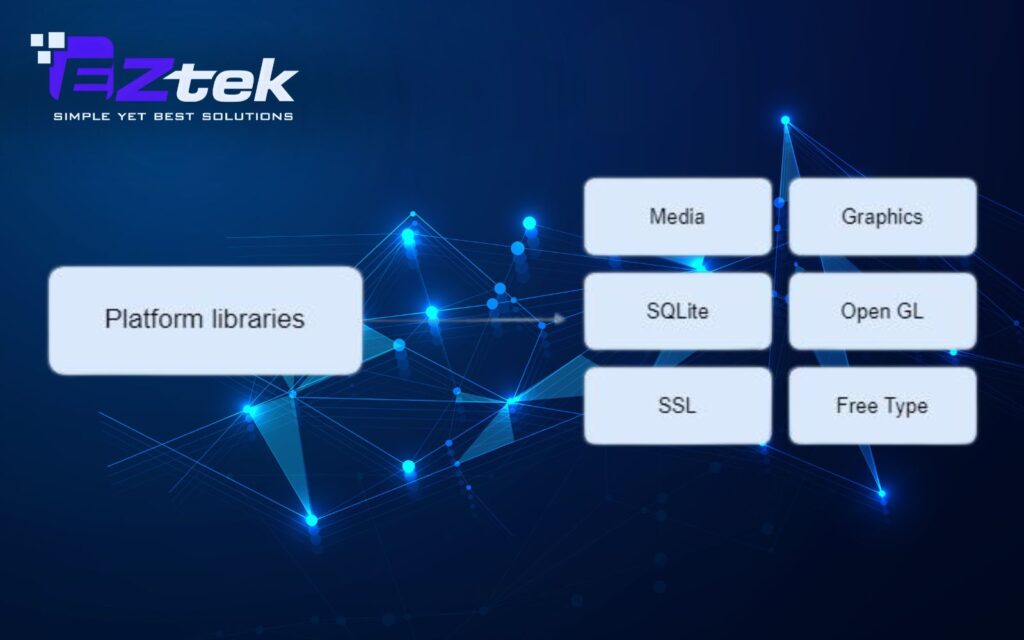
Sitting above the kernel, these C/C++ libraries provide the heavy lifting for media and graphics. This layer of the Android architecture framework includes:
- Media Framework: Powers audio and video playback/recording.
- SQLite: Offers a lightweight, built-in database for storage.
- WebKit & SSL: Enables web browsing capabilities and secure, encrypted connections.
- OpenGL/SGL: Dedicated engines for rendering high-performance 2D and 3D graphics.
Linux Kernel
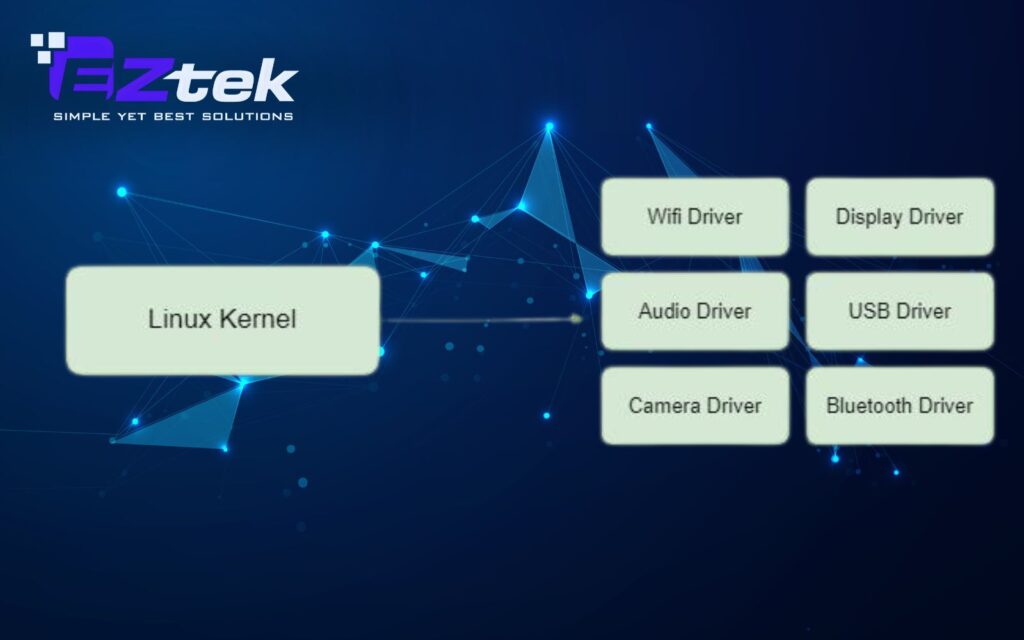
The Linux Kernel forms the foundation of Android architecture and directly interfaces with device hardware. It manages essential drivers such as display, camera, Bluetooth, audio, and networking, providing a hardware abstraction layer for the rest of the system.
Key responsibilities of the Linux Kernel include:
- Security, enforcing isolation between apps and system resources.
- Memory Management, efficiently allocating and freeing memory.
- Process Management, controlling how processes are scheduled and executed.
- Network Stack, handling data transmission and connectivity.
- Driver Model, ensuring hardware compatibility across manufacturers.
Common Android Architecture Patterns
MVC
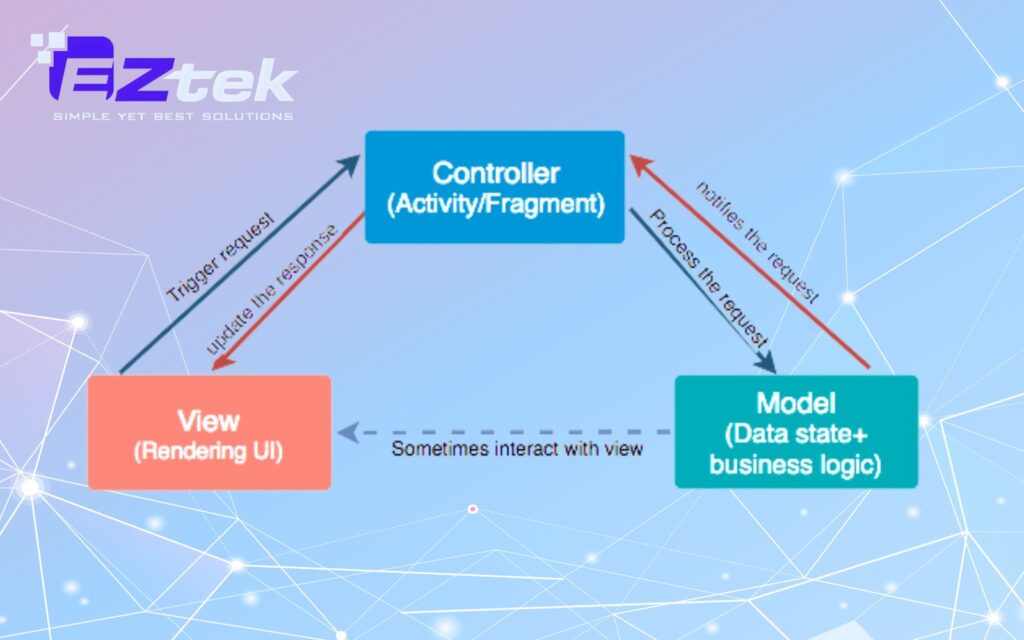
MVC is one of the earliest patterns adopted in Android architecture. It structures an application into three distinct parts:
- Model is responsible for handling data and core business rules. It manages data operations such as fetching, updating, and storing information, then informs other components when data changes.
- View focuses solely on presenting the user interface, including layouts, screens, and UI elements. It reflects the current state of the data but does not process logic.
- Controller handles user interactions and acts as a mediator between the Model and the View. In Android, Activities and Fragments often take on this role.
While MVC helps separate concerns at a basic level, Android implementations often suffer from tight coupling, where Activities become overly complex and harder to maintain as applications grow.
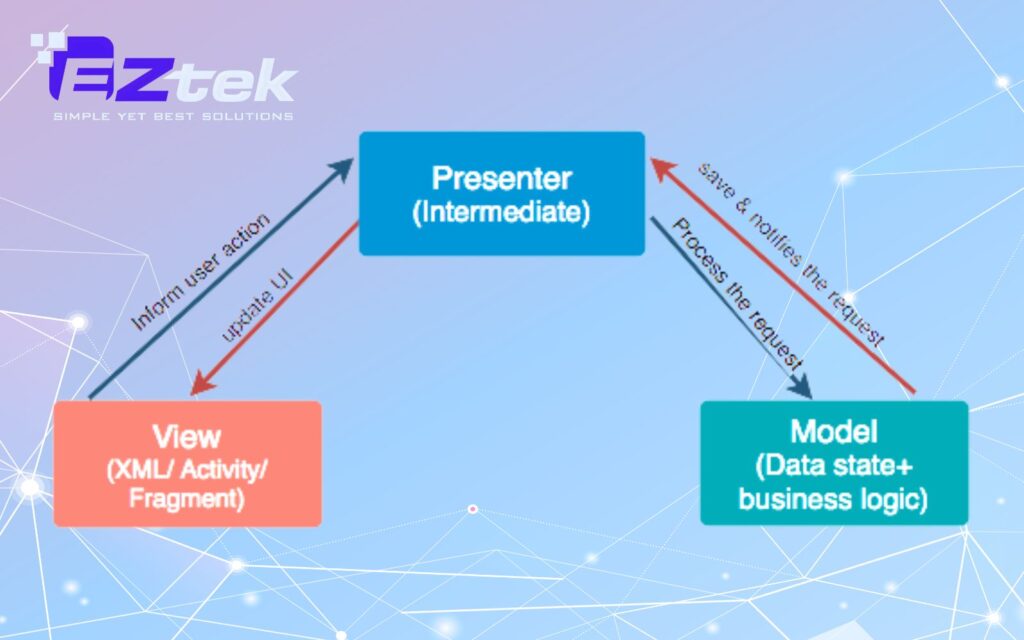
MVP
MVP refines the MVC approach by moving UI-related logic out of the View and into a dedicated Presenter, resulting in cleaner and more testable code.
- Model manages data and business rules without direct knowledge of the UI.
- View is kept lightweight and passive, responsible only for displaying data and forwarding user actions.
- Presenter contains presentation logic, processes user input, retrieves data from the Model, and updates the View accordingly.
This structure improves unit testing and flexibility, making MVP a popular choice in many Android architecture samples. However, it often requires additional interfaces and boilerplate code, which can increase development overhead.
MVVM
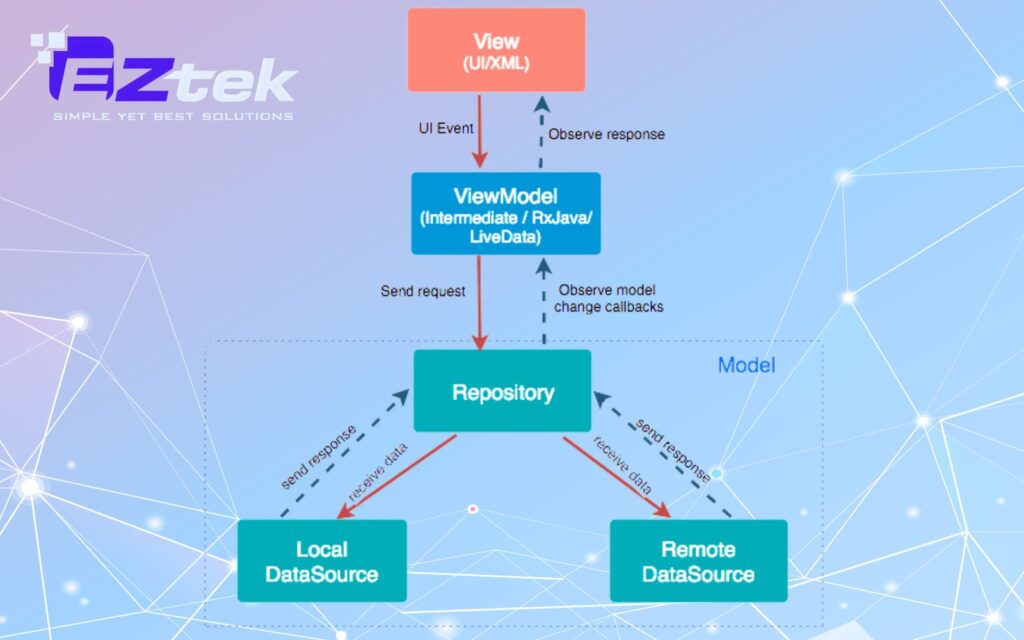
MVVM is one of the most widely adopted Android architecture patterns, especially with Google’s Jetpack libraries.
- Model supplies data and business logic to the application.
- View handles UI rendering and user interactions but avoids business logic.
- ViewModel acts as a bridge between the Model and the View, transforming data into a format suitable for display and exposing observable data streams.
By using data binding and observable components, MVVM enables automatic UI updates when data changes. This reduces boilerplate code and improves lifecycle awareness. Despite its advantages, MVVM can feel complex for smaller projects and requires familiarity with reactive programming concepts.
MVI
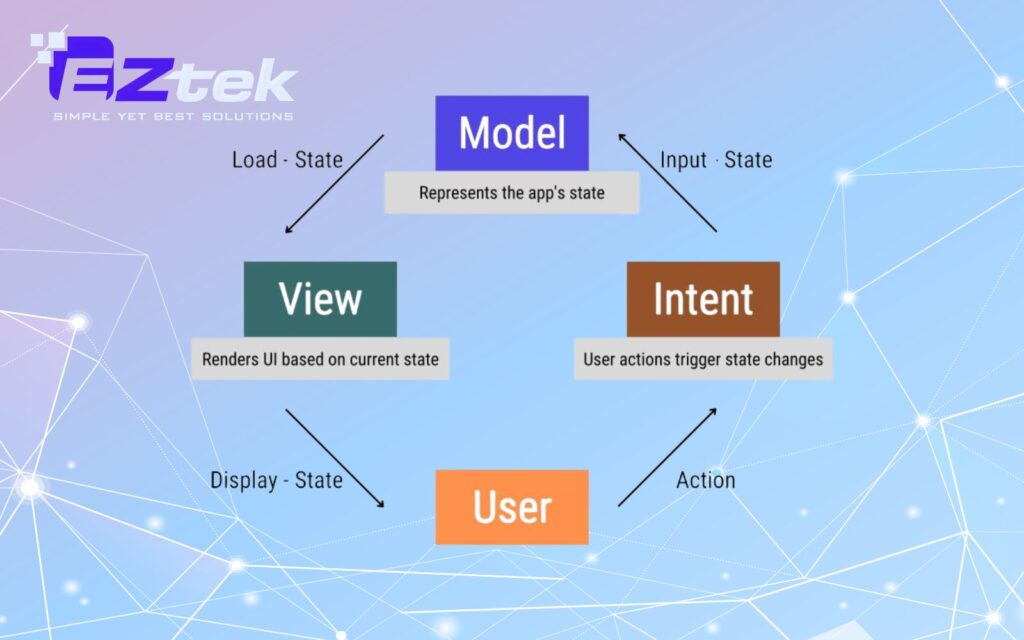
MVI is a reactive pattern that emphasizes predictable state management through unidirectional data flow.
- Model represents the complete state of the application at any given time and remains immutable.
- View renders the UI based on the current state and translates user actions into Intents.
- Intent captures user actions and triggers state updates in a controlled manner.
This approach makes application behavior easier to reason about and debug, especially in complex UIs. However, the strict structure and verbose setup can be excessive for simple apps and small teams.
Clean Architecture
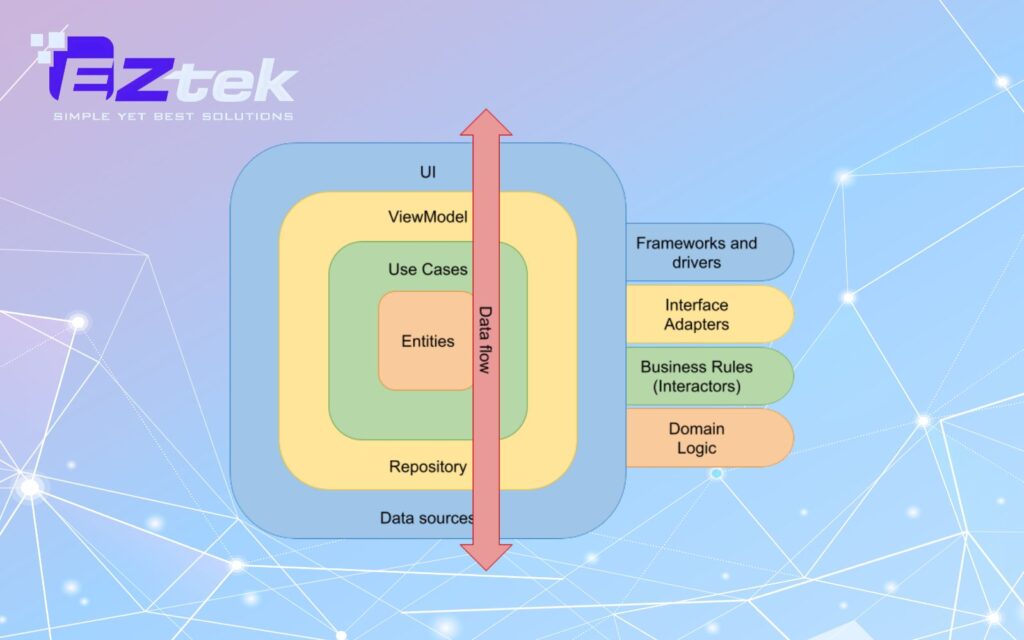
Clean Architecture, proposed by Robert C. Martin, promotes a strict separation of concerns through layered design.
- Entities define core business rules and domain models, remaining framework-independent.
- Use Cases (Interactors) contain application-specific business logic.
- Interfaces (such as Controllers and Presenters) manage communication between layers.
- Frameworks & Drivers include external tools like databases, APIs, and UI frameworks.
This approach supports modularity and long-term scalability, allowing individual layers to evolve independently. Although it requires more initial planning and effort, Clean Architecture is well-suited for large-scale Android applications where maintainability and flexibility are critical.
Key benefits of Android App Architecture
A well-structured Android architecture helps developers build stable, scalable, and secure applications that perform consistently across a wide range of devices. By organizing the system into clear layers, Android simplifies development and long-term maintenance:
- Modularity & Scalability: The layered design of Android architecture allows components to be updated or extended independently, making apps easier to maintain and scale.
- Broad Hardware Compatibility: Android runs smoothly on many device types thanks to hardware abstraction, ensuring consistent app behavior across different manufacturers.
- Optimized Memory & Performance: Android Runtime efficiently manages memory and system resources, helping apps run smoothly even on low-end devices.
- Enhanced Security & Privacy: Built-in security mechanisms protect user data and isolate apps to reduce security risks.
- Flexibility & Open-Source: As an open-source platform, Android supports customization, multiple programming languages, and diverse use cases across industries.
EZTEK – A Trusted Web/Mobile Application Development Company
Building a successful mobile application requires a perfect blend of design thinking and a deep mastery of Android architecture. With years of experience in the software industry, EZTEK stands as a premier provider of innovative Web application development and Mobile application development solutions, helping businesses streamline operations and elevate customer experiences.

At EZTEK, we do more than just write code; we engineer a robust foundation for your digital growth. Our team of experts strictly adheres to the most modern Android architecture patterns, such as MVVM and Clean Architecture, while integrating cutting-edge Android architecture components. This ensures every product meets international standards for performance, high-level security, and long-term scalability.
Partnering with EZTEK provides your business with:
- Customized Solutions: App development tailored to your specific business needs and industry requirements.
- Top-Tier Technology: Constant updates on the latest trends in the Android architecture framework to maintain your competitive edge.
- Professional Workflow: A transparent process from initial consultation and design to deployment and maintenance, delivered on schedule.
- Quality Assurance: Guaranteed stability across a vast range of devices by implementing standardized Android architecture layers.
EZTEK is ready to be the strategic partner that turns your boldest technological ideas into reality. We are committed to delivering sustainable value and absolute satisfaction through high-quality software products that stand the test of time.
Android architecture plays a critical role in shaping how modern Android applications are designed, scaled, and maintained. A clear architectural approach helps teams manage complexity, improve performance, and ensure long-term code quality across different devices. Apply proven Android architecture principles and partner with EZTEK to build powerful, future-ready Android applications.